
12 October 2009
Telnet in Windows 7
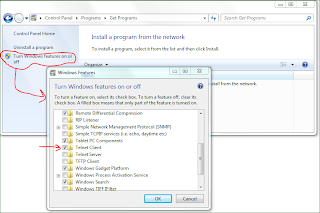
I'm using Windows 7 professional. The telnet client is not available by default. But it is easy to add it. Go to Control Panel -> Programs -> Get Programs. Then click "Turn Windows features on or off". Click "Telnet Client" and OK.

09 October 2009
Create ant tasks in build.xml from external (jar) file in project
I will show how to use an ant library with ant tasks without adding the external jar file on the classpath on your computer (for some reason, perhaps so everybody in your team can run them without installment on their local computer).
In this example I will use the Ivy library. It is kind of a silly example since Ivy itself is a tool so no jar files needs to exist in the project directory.
Download and place the external jar file in your project directory. I placed the file ivy-2.1.0-rc2.jar in a directory called lib.
Use a zip-program (for example 7Zip) and look in your jar file to see where the file antlib.xml is. For Ivy this is org/apache/ivy/ant/antlib.xml.
The next step is the make up a namespace. I say makeup, because you can use whatever you like. However it is good to use the form antlib:java package. This way it will work when you one day remove the external library from your project and add in the ant-library directory on your local computer (then you wont need the taskdef). For Ivy the namespace is antlib:org.apache.ivy.ant. For more information see http://ant.apache.org/manual/CoreTypes/antlib.html.
Next is to write the build.xml file:
The content of xmlns:ivy="antlib:org.apache.ivy.ant" must match the uri="antlib:org.apache.ivy.ant". The XML namespace xmlns:ivy is arbitrary but it must match the task namespace <ivy:retrieve />.Choose a good namespace that maches your external feature (only one word).
Note how I used a wildcard to reference the ivy-2.1.0-rc2.jar. It can be good if a new version of the jar is published.
I can now access all the tasks defined in the antlib.xml file with the ivy namespace.
In this example I will use the Ivy library. It is kind of a silly example since Ivy itself is a tool so no jar files needs to exist in the project directory.
Download and place the external jar file in your project directory. I placed the file ivy-2.1.0-rc2.jar in a directory called lib.
Use a zip-program (for example 7Zip) and look in your jar file to see where the file antlib.xml is. For Ivy this is org/apache/ivy/ant/antlib.xml.
The next step is the make up a namespace. I say makeup, because you can use whatever you like. However it is good to use the form antlib:java package. This way it will work when you one day remove the external library from your project and add in the ant-library directory on your local computer (then you wont need the taskdef). For Ivy the namespace is antlib:org.apache.ivy.ant. For more information see http://ant.apache.org/manual/CoreTypes/antlib.html.
Next is to write the build.xml file:
<project name="ivyhgtest" xmlns:ivy="antlib:org.apache.ivy.ant">

  <target name="resolve" description="--> retreive dependencies with ivy">
    <path id="ivy.classpath">
      <fileset dir="lib/" includes="ivy*.jar" />
    </path>

    <taskdef resource="org/apache/ivy/ant/antlib.xml"
      classpathref="ivy.classpath"
      uri="antlib:org.apache.ivy.ant" />

    <ivy:retrieve />
  </target>
</project>
The content of xmlns:ivy="antlib:org.apache.ivy.ant" must match the uri="antlib:org.apache.ivy.ant". The XML namespace xmlns:ivy is arbitrary but it must match the task namespace <ivy:retrieve />.Choose a good namespace that maches your external feature (only one word).
Note how I used a wildcard to reference the ivy-2.1.0-rc2.jar. It can be good if a new version of the jar is published.
I can now access all the tasks defined in the antlib.xml file with the ivy namespace.
08 October 2009
Mini evaluation of Maven repository managers
If your company is using some kind of dependency management system (for example Ivy or Maven) it is strongly recommended that you use a company-repository. This repository has two purposes:
As of today there are three Maven repository managers (see http://docs.codehaus.org/display/MAVENUSER/Maven+Repository+Manager+Feature+Matrix): Archiva, Artifactory and Nexus.
I have made a small evaluation (I have tried them for about 30 min each). I must say that they are all very similar. They will all probably work for you. They are all web based.
My favorite for now is Nexus. This is because the GUI is rather simple, you can create virtual groups of repositories.

.
- Cache of third party libraries to speed up fetching (it really makes a difference!)
- Releasesof your own software to it is available to the others in the company.
As of today there are three Maven repository managers (see http://docs.codehaus.org/display/MAVENUSER/Maven+Repository+Manager+Feature+Matrix): Archiva, Artifactory and Nexus.
I have made a small evaluation (I have tried them for about 30 min each). I must say that they are all very similar. They will all probably work for you. They are all web based.
My favorite for now is Nexus. This is because the GUI is rather simple, you can create virtual groups of repositories.

07 October 2009
The ultimate project structure
Well I don't think there is an ultimate project structure. But I think the default project structure that is used in Maven is very good. The basic for a java project looks like this:

A common objection of this is why so many levels? Why src/main/java when src is enough? I will try to break it down:
Why main/test?
You probably have both main code and test code. A separation of those is not bad. You will perhaps have documentation. Then you could create a src/doc directory.
Why src/xxxx/java?
You can probably have other languages. Or perhaps things that are not languages for example "resources".

Why main/test?
You probably have both main code and test code. A separation of those is not bad. You will perhaps have documentation. Then you could create a src/doc directory.
Why src/xxxx/java?
You can probably have other languages. Or perhaps things that are not languages for example "resources".
Ivy + Ant versus Maven
I have tried both Maven and Ivy + Ant enough to make a simple comparison. Ivy is a dependecy management system. It means in other words that you don't have to check in the binary jar files of dependencies you have in your project. Maven is also a dependecy management system but it is much more then that. Maven also has project management and build features.

Maven usage has increased in the open source community. But there are some problems:

- Maven is complex and hard to learn. This is from my own experiance. Even though it is rather simple to get a basic project to "talk" Maven, it becomes very hard when you have some special thing (for example some strange build task).
- Documentation is lacking. Many of the features in Maven is not documented good enough on the official Maven page.
- Complex syntax. This is perhaps of lesser importance when there is a good Eclipse plugin. But it still is a hassle to insert 11 lines in the Maven project descriptor file just to change the Java Compile level.
- You have to write Ant files (or some other script) to build your system. Maven can build and test by a declaration-language.
- The plugin to find dependencies for Ivy in Eclipse is... well non-existent. Maven has a find and browse dialog to find dependencie.
05 October 2009
Windows Experience Index for "Primary hard disk" with SSD

Tried an SSD disc in my laptop
I have now tried the Intel X25-M G2 80GB SSD disc in my Laptop.

I previously had a Samsung 5400 rpm disc. The difference is notable! On a subjective level the computer feels more responsive. Opening and closing programs goes much faster! On a objective level I compared with my previous disc.
Start Windows 7 (from power on button), login to active directory domain, launch mysql, and skype
X25-M G2: 45 s
Samsung 5400 rpm: 95 s
Worth mentioning is that the BIOS startup process takes 12 s.
Clean and compile a big Java project in Eclipse (first time)
X25-M G2: 50 s
Samsung 5400 rpm: 116 s
Clean and compile a big Java project in Eclipse (second time)
X25-M G2: 22 s
Samsung 5400 rpm: 40 s
Clearly the OS disc cache in RAM has a big impact the second time.
It is clear that disc intensive operations takes half the time. Sometimes even faster. The booting of Windows is such a example (if the BIOS startup process is subtracted). The reason for this (I'm guessing) is that performance degrades on a spinning drive when several processes accesses the disc in parallel.
I hope that Windows 7 can use the TRIM command so that performance of my SSD disk doesn't degrades over time as the disc fills.

I previously had a Samsung 5400 rpm disc. The difference is notable! On a subjective level the computer feels more responsive. Opening and closing programs goes much faster! On a objective level I compared with my previous disc.
Start Windows 7 (from power on button), login to active directory domain, launch mysql, and skype
X25-M G2: 45 s
Samsung 5400 rpm: 95 s
Worth mentioning is that the BIOS startup process takes 12 s.
Clean and compile a big Java project in Eclipse (first time)
X25-M G2: 50 s
Samsung 5400 rpm: 116 s
Clean and compile a big Java project in Eclipse (second time)
X25-M G2: 22 s
Samsung 5400 rpm: 40 s
Clearly the OS disc cache in RAM has a big impact the second time.
It is clear that disc intensive operations takes half the time. Sometimes even faster. The booting of Windows is such a example (if the BIOS startup process is subtracted). The reason for this (I'm guessing) is that performance degrades on a spinning drive when several processes accesses the disc in parallel.
I hope that Windows 7 can use the TRIM command so that performance of my SSD disk doesn't degrades over time as the disc fills.
Subscribe to:
Posts (Atom)