A colleague of mine had some problems with very high temperatures in a laptop. The temperatures was about 71 degrees Celsius at idle and 91 degrees Celsius a full load. (It was a HP laptop with some kind of dual core). I opened the laptop up and took out the fan. In the space between the outlet of the fan and the heat pipe there was a rather thick layer of dust. I cleaned it and now the temperatures where about 5 degrees lower.
I my colleague's case there is probably something else wrong with the fan (or computer), but it is clear that a little bit of dust defensively can have an effect on the temperature (and sound level).
03 June 2009

02 June 2009
Breakpoint problem with Eclipse 3.4 and JDK 1.6 update 14
I had problems that some break points did not take in my Eclipse 3.4.1 when I updated from JDK 1.6 update 12 to JDK 1.6. update 14. Well some breakpoints took, but none in the AWT thread. It could be a coincidence, I don't know.
I updated to Eclipse 3.4.2 but that did not solve the problem.
I had to downgrade to JDK 1.6 update 13 to solve the problem. It was enough to choose another JDK for my specific project. Eclipse itself could run update 14.

I searched the Internet but could not find any official bug either in Java or Eclipse. Anybody out there got more information?
Update: the problem is now fixed: http://blog.lesc.se/2009/09/jdk-breakpoint-problem-fixed-in-update.html
I updated to Eclipse 3.4.2 but that did not solve the problem.
I had to downgrade to JDK 1.6 update 13 to solve the problem. It was enough to choose another JDK for my specific project. Eclipse itself could run update 14.

I searched the Internet but could not find any official bug either in Java or Eclipse. Anybody out there got more information?
Update: the problem is now fixed: http://blog.lesc.se/2009/09/jdk-breakpoint-problem-fixed-in-update.html
01 June 2009
Java VisualVM, a better JConsole
A new tool is available for Java developers: VisualVM. JDK 1.6 update 7 and later comes bundled with this new tool. The executable (jvisualvm) can be found in bin or the tools directory.
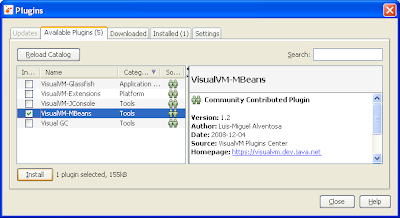
The first thing I recommend doing is to install the MBean plugin. With this plugin VisualVM gets the mbean feature found in JConsole. In fact I never uses JConsole anymore since VisualVM has all the features, and more.
To install the plugin select Tools -> Plugins -> Available Plugins. Check the VisualVM-MBeans and press install:
Now attach to a process by clicking on it in the list. If the process is on another computer use the Remote-node.
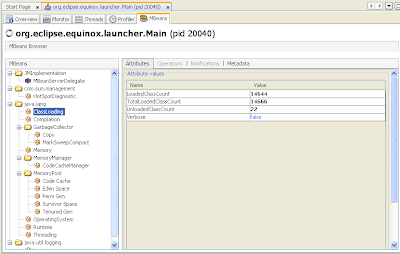
This is how the MBeans tab looks like:
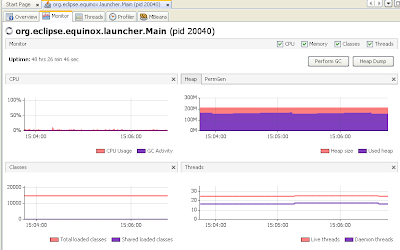
This is how the monitor tab looks like:
The first thing I recommend doing is to install the MBean plugin. With this plugin VisualVM gets the mbean feature found in JConsole. In fact I never uses JConsole anymore since VisualVM has all the features, and more.
To install the plugin select Tools -> Plugins -> Available Plugins. Check the VisualVM-MBeans and press install:

Now attach to a process by clicking on it in the list. If the process is on another computer use the Remote-node.
This is how the MBeans tab looks like:

This is how the monitor tab looks like:

Btrace – a debugging tool with bugs
I tried Btrace (http://btrace.dev.java.net/) it is a debugging tool for Java. I have often been in the situation that a bug has been found in a production system. The production system must run even as I try to find the cause of the bug. That means the (java) program cannot be restarted to add some remote debugging ports or some other start-up options. This is where Btrace comes in. With Btrace you can write small script-like java code fragments so the program can be traced. Btrace accomplishes this by dynamically instrumenting the code.
Let’s take an example. Let’s say your production system tries to find numbers in the Fibonacci sequence:
When installed, right click on the process and select “Trace application…”.

Then paste (or write) the code fragment and press Start. When pressing Start it takes a few seconds for the code to be instrumented. The output is shown in the console below the code fragment.

A little bit more advanced fragment that will print the method arguments when the method nextFibonacci is called:
Everything is not good about Btrace:
Let’s take an example. Let’s say your production system tries to find numbers in the Fibonacci sequence:
import java.util.ArrayList;This Btrace code fragment will print out a trace string to the Btrace console every time the method calculateNext is entered:
import java.util.List;
public class FibonacciService {
private List<Integer> list = new ArrayList<Integer>();
public FibonacciService() {
//First two numbers in Fibonacci sequence.
list.add(0);
list.add(1);
new Thread(new Runnable() {
public void run() {
while (true) {
calculateNext();
try {
Thread.sleep(10000);
} catch (InterruptedException e) {
e.printStackTrace();
}
}
}
}, "calc-thread").start();
}
private void calculateNext() {
int oldOld = list.get(list.size() - 2);
int old = list.get(list.size() - 1);
int newNumber = nextFibonacci(oldOld, old);
list.add(newNumber);
System.out.println(newNumber);
}
private static int nextFibonacci(int oldOld, int old) {
return oldOld + old;
}
public static void main(String args[]) {
new FibonacciService();
}
}
@OnMethod(Btrace code fragments can be attached to running java processes in two ways. Either use the command line “btrace” command or use a plugin to Suns Java VisualVM. Java VisualVM is like a Jconsole on steroids. It s is included in the JDK bundle since 1.6 update 7 (or something like that). You will find it in the JDK installation directory (either in tools, or in bin). Follow these instructions to add Btrace capabilities to VisualVM: http://btrace.dev.java.net/visualvm_uc.html.
clazz="se.lesc.btrace_example1.FibonacciService",
method="calculateNext"
)
public static void onStartCalc() {
println("Starting to calculate new number...");
}
When installed, right click on the process and select “Trace application…”.

Then paste (or write) the code fragment and press Start. When pressing Start it takes a few seconds for the code to be instrumented. The output is shown in the console below the code fragment.

A little bit more advanced fragment that will print the method arguments when the method nextFibonacci is called:
@OnMethod(A fragment that prints out the return value when the nextFibonacci method is returned:
clazz="se.lesc.btrace_example1.FibonacciService",
method="nextFibonacci"
)
public static void onNextFibonacci(int oldOld, int old) {
print("Input values are ");
print(str(oldOld));
print(" and " );
print(str(old));
println();
}
@OnMethod(There are some restrictions on how advanced the fragments can be. Because the code must never get stuck loops are not allowed. Creating objects arbitrary is not allowed nor calling any methods (except from the BTraceUtils class).
clazz="se.lesc.btrace_example1.FibonacciService",
method="nextFibonacci",
location=@Location(Kind.RETURN)
)
public static void onNextFibonacci(int returnValue) {
print("Result is: ");
print(str(returnValue));
println();
}
Everything is not good about Btrace:
- Slow web page. Perhaps not Btrace fault. The entire *.dev.java.net servers are so slow that it is annoying.
- There is always a risk when instrumenting the code. Out of about 30 runs I had 3 unexpected crashes of the JVM that I can remember. It is with other words somewhat of a risk to run Btrace in a production environment.
- Some features don’t work. For example I tried to use a regular expression to match a method but every time I got java.lang.VerifyError (Edit: I've now submitted a bug report for it: https://btrace.dev.java.net/issues/show_bug.cgi?id=41). Another example is that I tried to get a reference to the current object in side a method, but it did not work.
- The documentation is need improvment. For example Btrace uses some kind of signature matching to find methods with arguments. How this matching is done is not documented. Such a central feature is really important to have documented.
- The project does not look to be actively developed. The last implemented ticket was submitted the 22th of February in 2009. Even critical and easy to fix problems is not fixed. For example in my opinion the bug about that Btrace cannot be run on Windows when there exist a space in the path should really be fixed. Edit: the project apparently has active development, based on the comments on this blog entry. :)
26 May 2009
Work with multiple workspaces in Eclipse
A workspace in eclipse consists of some projects and settings (for example code formatting). If you are working on different things it is useful to have multiple workspaces. My recommendation is that you create a shortcut for each workspace. In Windows create a new shortcut and set the target to:
The
"C:\Program Files\eclipse\eclipse.exe"
  -data "C:\Documents and Settings\lennartsc\My Documents\workspace_test"
  -showlocation Test
  -vm "C:\Program Files\Java\jdk1.6.0_12\bin\javaw" -vmargs -Xmx900M
The
data parameter is the location of your workspace. The showlocation parameter is useful when you Alt-Tab between different Eclipse instances so it is possible to distinguish between them. The vm parameter is not needed, unless you want to specify the JVM (useful if you are using Maven). The last parameter, Xmx is good is you want Eclipse to have more memory.
29 April 2009
Ask a programming related question on stackoverflow.com
One of the best "programmer-asks-questions-formus" I know is stackoverflow.com. It is just like the old experts-exchange, except it is free and it contains no commercials. It is also very simple to ask questions. Just log in with your openID and ask a question!
I have been a reader for some months now but today I finally asked my first question: http://stackoverflow.com/questions/802612/how-to-write-a-null-safe-compare-in-pure-sql.
I have been a reader for some months now but today I finally asked my first question: http://stackoverflow.com/questions/802612/how-to-write-a-null-safe-compare-in-pure-sql.
27 April 2009
Bouncing balls and collision detection
One of the first assignments on the first Java course on my computing science program was to create a program with bouncing balls. The balls should be able to bounce of the walls. There was no requirement for the balls to bounce of each other.
Is there a simple model for bouncing two balls? One approach is to only look at one ball at a time and consider the other ball as a rigid object. The in angle should be the same as the out angle:

The result: a very simple ball simulation program:

There are of course some bugs. Like that the balls can escape... :) Try it out! If the balls get stuck drag them into a new position. Balls version 0.0.1
Is there a simple model for bouncing two balls? One approach is to only look at one ball at a time and consider the other ball as a rigid object. The in angle should be the same as the out angle:

The result: a very simple ball simulation program:

There are of course some bugs. Like that the balls can escape... :) Try it out! If the balls get stuck drag them into a new position. Balls version 0.0.1
Subscribe to:
Posts (Atom)